Showing posts with label link download. Show all posts

Monday, January 4, 2010

How to create and define Photoshop Brushes

Two basic general features that characterize brushes set limits on what can be successfully turned into a brush. And what can be a brush is almost anything.

  • First is color. Photoshop uses gray scale info while defining brushes. You can make a brush out of a colorful image but converting your document to Grayscale will give you a better idea of what you are doing. Anything that is white becomes transparent (0% opacity), anything black becomes 100% opaque and any other color turns translucent (opacity somewhere between 0 and 100%).
  • Second limitation is size: there is a maximum brush size possible. From Photoshop 7.0 on it's 2500 px x 2500 px (and 999 px for earlier versions). The larger the brush is created the better, so we strongly encourage you to create large brushes (ideally about 2500 px x 2500 px). The reason is you can’t increase the diameter of your brush beyond its original size without blurring.

There are plenty of ways to create a brush. You may start from a scanned image, a vector graphics,
a raster graphics or a photo.

We will guide you through a process of creating a sample brush in Adobe Photoshop CS4 from
a scanned ink stroke.

Step 1

Create a black ink stroke on a white paper and scan it. The optimum scan settings will vary depending on your scanner quality. Here, we set the resolution to 200 dpi.

Stroke Scan

Step 2

Open your scan file in Photoshop and change the color mode to 8-bit Grayscale (Image > Mode).

Step 3

You need some time to clean the image. With your bare eye it may look ok but it’s important to always make sure that there are no artifacts. Great tools to do that are (alternatively) levels and threshold. Open the Image > Adjustments > Levels panel and drag the left slider in the Input Level panel right to the end

Pohotoshop level panel

or open the Image > Adjustments > Threshold panel and drag the slider right to the end

Photoshop threshold panel

It may happen that the background turns grey (after levels adjustment)

Background

or totally black (after threshold). That means the white background is not truly white. Note, in this step always choose ‘Cancel’ - we only want to identify possible artifacts.

Step 4 (Fixing the background - if necessary)

We will use Levels.

Drag the right slider in the Input Levels panel slightly left. That turns the brightest pixels white. To check if the right slider is moved enough, drag the left slider right to meet the right one. If the background stays white, the right slider position is ok. Bring the left one back to its origin.

Step 5 (Further cleaning - if necessary)

Once the background is fixed repeat Step 3. Now you can easily see plenty of very tiny ink stains all around our stroke. Some of them may add some character to you brush, but we want to get rid of the majority of them.

level

There is a trick how to do that effectively and easily. Create a white background layer. Duplicate your stroke layer and turn its visibility off. Apply levels or threshold adjustment as you did before to the stroke copy layer but this time hit the OK button. Now, create a mask and start to paint over all unwanted stains with a black brush.

Photoshop trick 1

Once all of the stains are masked, drag the mask to the stroke layer, turn it on and delete the copy.

Photoshop trick 2

Step 6

Your stroke is now clean, you can adjust it a bit, again using Image > Adjustments > Levels (or Brightness/Contrast, Exposure, Curves, Threshold). Hit OK once you get an appearance you are satisfied with

Level final

Step 7

Now, with a stroke ready to be turned into a brush

Stroke final

go to Edit > Create Brush Preset. Choose a name for your brush and hit OK.

Create brush preset

A new brush is created. You did not have to select your image since Photoshop recognizes all pixels that are not white and include them into a new brush area. However, if you select a portion of your image, only the selection will be turned into a brush.

Test your brush and enjoy!

What next? If you want to export your brushes (eg. send them to myPhotoshopBrushes.com) go to Edit > Preset Manager, choose Brushes as the Preset Type and select all your new brushes holding the Shift key. Pressing the Save Set button saves the whole pack as an .abr file.

Brush preset manager

If you decide to share your (own!) brushes with us, please send us a link to your site and/or a zipped .abr file as well as a terms of use info (required) and a 300 px x 300 px preview.

SOURCE : http://myphotoshopbrushes.com


Read More.

Bookmark and Share

Tuesday, August 11, 2009

winamp change your AIMP with a more classic look to its


this simple picture as I do for example uplopad image software play songs, I used to use winamp, but now I prefer to use a more simple AIMP and the computer does not make us weak and I also like the look of it is quite interesting if we tough in the image of on whether you like the view as the image display on the
if you like with this software you can download here


good job for all the success you always


<---------------------------------------------->

download AIMP

Read More.

Bookmark and Share

Sunday, August 9, 2009

Free download CCleaner Version v2.21.940


Version download CCleaner Version v2.21.940 latest free .. Or CCleaner Crap Cleaner is a tool that can be used to optimize the performance of Windows systems. This tool works by removing all temporary files that are not used so that more hard disk space and the width of the system will speed up the performance of your windows. In addition, this tool can also be used for free (free).

CCleaner work with this how to delete some files from:

*

Internet Explorer Cache, History, Cookies, Index.dat.
*

Recycle Bin, files and Log files temporari.
*

Delete all files and URLs that has just opened.
*

Third-party applications usually create a file in the temp folder and a list of files that we open, including: Firefox, Opera, Safari, Google Chrome, Media Player, emule, Kazaa, Google Toolbar, Netscape, Office, Nero, Adobe, Acrobat, WinRAR, WinAce, WinZip and others.
*

Do a search on the Registry entries and delete all entries that are not used. Including the file extension such as: ActiveX Control, CalssIDs, ProgIDs, Uninstallers, Shared DLLs, Fonts, Help Files Application Paths, Icon, Invalid Shortcuts and various other files. Before cleaning feature is also provided for membackup registry first.
*

This application can also be used to remove all the startup files that can worsen the performance of windows in which the loading process will be long.

CClener than this for free, also has the ability to work quickly to find all the files and the entry on your Windows system.

chik hare download CCleaner Version v2.21.940


Read More.

Bookmark and Share

Thursday, August 6, 2009

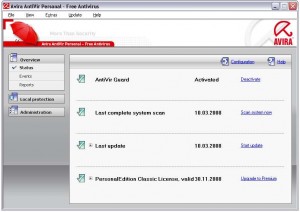
Avira Free Antivirus Personal Edition

Avira Free Antivirus is one of the best Antivirus software available. Considering the fact that it is totally Free, Avira is just amazing.

Avira AntiVir Personal Free Antivirus is a comprehensive, easy to use antivirus program, designed to offer reliable virus protection to home-users. It protects your computer against dangerous viruses, worms, Trojans and costly dialers. It also includes a basic Anti-Spyware. And it offers all this completely free of charge. .
Avira Free Antivirus


Some of the features that we love about this Free Antivirus:

* Very high rates of virus and malware detection using innovative search technologies (search engines) and heuristic search processes
* It runs in your system’s background, and doesn’t hogs down system’s resources.
* Scanner (On-Demand Scan) with profile-controlled and configurable search for all known types of virus and malware
* High-performance multithreading function (simultaneous high-speed scanning of multiple files)
* Integrated quarantine management to isolate and process suspicious files
* Rootkit protection for detecting hidden malware installed in your computer system (rootkits)
* Guard (On-Access Scan) for continuous monitoring of all file access attempts.
* Simple and quick updates to the program, virus definitions, and search engine through Single File Update and incremental VDF updates via a webserver on the Internet.


Download Link1: Click Here to Download

Read More.

Bookmark and Share

Sunday, July 26, 2009

tutorial adsense languages indonesia

simpel image minimize.


I lot more busy work so not had time to post this cuman existing aja download, you can learn languages with adsense indonesia

Click hare to download


Read More.

Bookmark and Share

Thursday, July 23, 2009

DOWNLOAD 30_Drippy_Sprays Brunes


BRUSNES For Photoshop CS2, CS3 and CS4 IF Tasting DOWNLOAD PLEASE CLICK HERE
You EXtra AFTER DOWNLOAD rar KOPY THEN PASTE TO FOLDER BRUSS PhotoShop
Enjoy and try


CHEK HARE TO DOWNLOAD 30_Drippy_Sprays Brunes


Read More.

Bookmark and Share

Sunday, July 19, 2009

download dragon brus for photoshop


DRAGON BRUNES

For Photoshop CS2, CS3 and CS4 IF Tasting DOWNLOAD PLEASE CLICK HERE
You EXtra AFTER DOWNLOAD rar KOPY THEN PASTE TO FOLDER BRUSS PhotoShop
Enjoy and try


ACEH NEWS CLICK ON MY BLOG UDIN-SIRA
Read More.

Bookmark and Share

Thursday, July 16, 2009

Download PCMAV Anti Virus Express For Clean Conficker

PC Media launched an antivirus PCMAV Express for Conficker claimed Conficker able to clean up thoroughly. Virus Conficker or often called Kido or Downadup is a virus that is dangerous, and even Microsoft to create a contest with great prizes for those who can catch the author.


chick hare Download PCMAV.rar Read More.

Bookmark and Share

Cara mudah download you tube

ini sedikit saya bahas tentang cara mendonwload youtube,
kebanyakan kawan2 mendonwload youtube dengan  mengkopy link dari gambar yg di sedia di video youtube  seperti gambar yang ada cewek tuh dan disampingnya ada garis merah yang di kolom link youtube

namun saya punya cara yg lebih cepat dan mudah mendownlod dan  apapun video anda bisa mendonwload dengan menggunakan Relplayer, jika anda pingin coba,

sekarang coba download softwer ini dulu disini
lalu istal softwer yang sudah anda download  dan jangan lupa tutup semua bruwser monzilla ato IE setelah anda mengistal dan samapai keluar tulisan finis,  buka lagi youtube lalu perhatikan ke arah  video youtube yg anda pingin donwload  seperti contoh gambar di bawah ini


NB : jika waktu anda mengistal di suruh masuk email anda  masukkan saja email apa saja yg sudah terdaftar lagi klik ok dan akan keluar finis
selamat mencoba semoga berhasil
saya berharup semoga tutorial ini bermafaat bagi anda semua
download RealPlayer11GOLD.exe Read More.

Bookmark and Share

Tuesday, July 14, 2009

download YIntai2Fz.zip.html

tutorial ini sebenar nya dari blog kawan juga nih alnya aku males ngetik dari blong ini
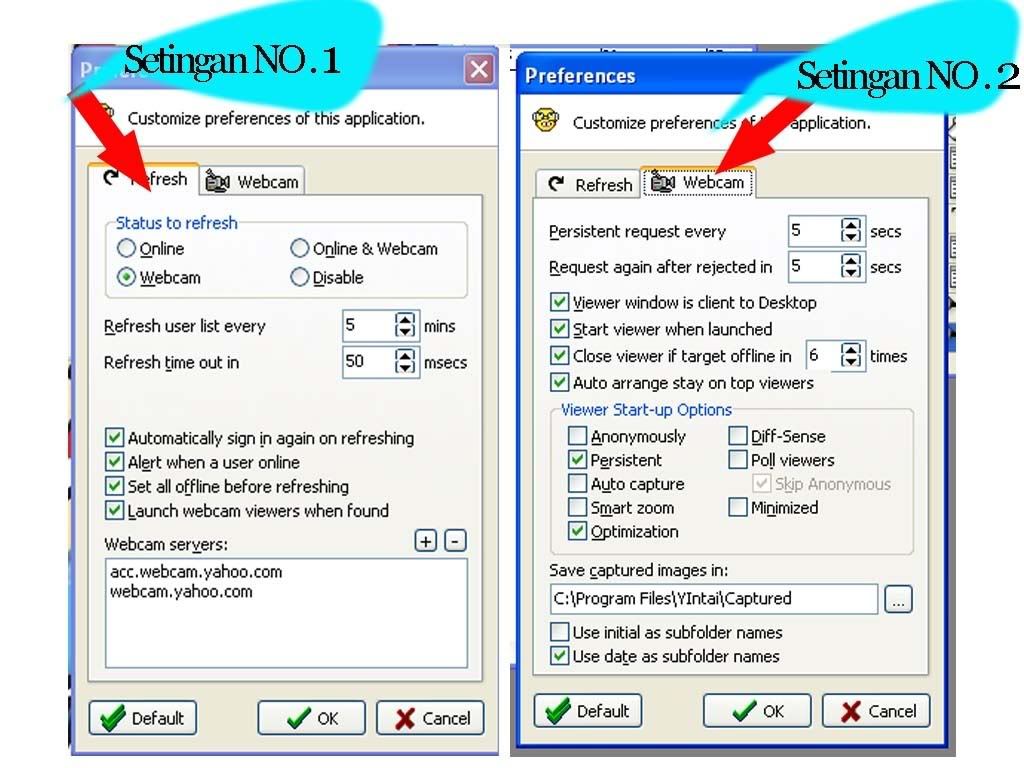
contoh Gambar cara setting Y intai 2Fz

TUTORIAL YIntai

Beberapa sahabat menanyakan tentang tutorial Yintai dan pengoperasiannya mungkin buat yang udah mahir posting ini ngga bakal menarik, tapi untuk yang belum tau semoga bisa dijadikan suatu pengetahuan yang bermanfaat asal jangan di pakai untuk ngintip orang mandi emang bisa? Ya bisalah Klo target OL di kamar mandi. ,oke dech berikut saya tuliskan tutorialnya,selamat berbingung ria…….


1.Install dulu Yahoo Messenger (krn basis Y!Intai adalah Yahoo Messenger). Jika belum punya Yahoo Messenger bisa download gratis di blog ini atau sahabat bisa klik aja disini.

2.Silahkan sahabat membuat beberapa id yahoo (10 ID Yahoo atau lebih),bukan buat ngeboot low, gunanya agar ID Yahoo tersebut nggak gampang dikenali dan di hafal oleh target kita. Lebih baik jika bikin id yahoo sesuai target kita, misal kita pengin intai webcam Indonesia maka bikin id dg nama Indonesia (contoh : saskia,linda_malam,fandy_imut.etc). Begitu pula jika pengin intai bule (contoh eko_van_gibso,dhalboet_boy.etc), pengin intai cina (contoh: amy_lee,kaka_liu,rotea_sinchan.etc) dsb sesuai target yang mo sahabat intai.

3.Download gratis dan Install Y!Intai2 Fz di sini atau bila sahabat pengen Yintai versi terbaru silahkan akses di http://www.angelfire.com/id/downstruck/ Gw saranin install Y!Intai versi 2C aja (krn bisa hidden viewer).

4.Download ID ini sebanyak 10.411 ID (…selamat moncrot dengan ID sebanyak ini) tapi ingat ini juga bukan ID booters low,tapi ID buat njalanin aplikasi Yintai. Silahkan sahabat klik aja disini low , buat download id tersebut,tapi mungkin mungkin dah banyak yang ngga bisa sebagai solusi silahkan Download di id FUUL


5.Setelah install Yintai silahkan sahabat, klik File Preferences (Folder Webcam) kemudian pilih (beri tanda) webcam (agar kita liat yg webcam-nya on aja). Untuk Refresh User List Every isi dg 10 (gunanya agar Y!Intai nggak nge-refresh terus krn akan mempengaruhi speed). Beri tanda (pilih) semua kotak KECUALI Automatically sign in again on refreshing

6.Klik File Preferences (Folder Webcam), isi Persistent request every 10 (gunanya begitu target menolak, maka dalam 5 detik Y!Intai akan berusaha intai lagi). Beri tanda (pilih) semua kotak KECUALI Always start viewer in annomyous mode (jika dipilih maka target akan menolak krn id yg muncul adalah annomyous sehingga target akan tahu kalo lagi mau dikerjai). Juga JANGAN PILIH Always start viewer in capture active (gunanya agar kita bisa record dg cara tekan capture hanya untuk adegan yg asyik aja shg akan menghemat hard disk)

7. Setelah Y!Intai terinstall…..masukkan list webcam yg pengin di intai dg cara klik File – import trus cari directory file (keterangan 4) disimpan,trus masukin id tersebut (kalo gak tau caranya mendingan banting aja PC nya)

8. Setelah list id yg bakal di intai terisi (bisa juga add id setelah connect), barulah login dg cara klik File – Sign In (masukkan id dan password fake Anda, lihat keterangan no 2). Agar bisa pakai Y!Intai….kita tidak perlu harus connect Yahoo Messenger tapi untuk bisa pakai Y!Intai harus install Yahoo Messenger dulu (lihat keterangan no 1). Di samping itu id yg sama tidak bisa dipakai untuk sign-in Y!Intai dan Yahoo Messenger pada saat yang bersamaan. Setelah login berhasil….maka Y!Intai akan mencari (me-refresh) id-id yang lagi on line sesuai list Y!Intai yang Anda add (keterangan no 4). Perlu kiranya diketahui….untuk bisa meng-intai…..user target harus accept, artinya Y!Intai bukanlah program View Webcam without Permission (dan hingga saat ini belum ada program yg bisa View Webcam without Permission). Artinya keberhasilan Anda untuk bisa meng-intai tergantung hokie juga….Apalagi sudah banyak orang yg tahu Y!Intai dan digunakan untuk meng-intai id (sasaran) yang sama shg keberhasilan pakai Y!Intai saat ini lebih sulit. Untuk itu….cobalah cari sasaran lain sesuai kreasi Anda (bisa juga cari id di room-room Yahoo)

9. Hasil capture (default) akan tersimpan di folder C:\YIntai\Captured dalam format jpg. Anda bisa merubah tempat penyimpanannya. Hasil Capture tsb bisa dibikin Film dg cara klik Plug-Ins Video Maker. .ato ada yg dah bisa monggo di share

sekedar info, bagi yg melakukan UPDATE (menggunakan yahoo massenger versi terbaru, versi 7 keatas) Yahoo Messenger terakhir akan menyebabkan Y!intai tidak bs digunakan saat anda mencoba view cam seseorang..msg error “NO SUCH INTERFACE SUPPORTED” Ini terjadi di 2 komputer gw Ternyata Update Yahoo menyebabkan beberapa file *.dll yg digunakan Y!Intai di hapus.

Silakan coba jalankan file

Read More.

Bookmark and Share

download CamStudio


hai kawan nih aku posting programuntuk rekam webcam cara nya gampang banget

  1. sekarang kita lanjut kan saja cara pakai nya
  2. beberapa cara menrecam webcam :

  3. 1. download dulu softwet nya di sini
2. istal sftwer yg sudah anda download
3. klik di tombol bulat yang berwarna merah
seperti gambar di samping


4. Bawakan mose anda ke yang anda mau recam
5. tunggu beberapa menit lalu klik stop tolbol yg warna biru seperti di gambar
5. setelah itu anda bisa liat lagi deh cam dia
selamat mencoba semoga sukses B s C
Free Download

maaf ya mohon di maklumi postingan saya agak ribet
maklum masih belajar nih B s C Read More.

Bookmark and Share

Firefox Monzlla


hai kawan-kawan walaupun nih blog tetang politik tapi
saya pingin bagi-bagi imfomasi juga sikit tetang frivox monzila
yang semua nya bahasa indonesia dan lebih cepat browser

Seperti gambar di atas anda bisa melihat semua ber bahasa indonesia


Contoh setup mozila firevox

Nah klo anda mau donwload kli link di bawah ini


download

Selamat mencoba semoga bermamfaat bagi anda


Read More.

Bookmark and Share

Monday, July 13, 2009

download HTML color V.1.4

ini saya ceritakan sedikit tentang sotfwer HTML color V.1.4
Apa fungsi utama dari software ini? lupa, mustinya tadi di awal. Fungsi dari software ini adalah untuk mengetahui kode warna yang tampil di layar monitor sobat, cara kerja singkatnya seperti ini, jika sobat berkunjung ke suatu website atau blog dan melihat ada warna yang sobat sukai, maka caranya yaitu running software HTMLcolor v.1.4 lalu sorot warna yang sobat sukai tersebut oleh mouse komputer, maka secara langsung pada display software tersebut akan di tampilkan kode warna HTML, ini juga sangat berguna bagi sobat yang suka menampilkan iklan adsense yang ingin warna backgroundnya sama persis dengan warna background blog miliknya. Agar lebih mudah untuk di mengerti, silahkan lihat tampilan panel dari software HTMLcolor V.1.4 di bawah ini :


HTML color V.1.4


Tampilannya kecil tapi sangat berguna. Terlihat pada panel sebelah kiri ada kotak kecil, ini berguna untuk melihat objek warna yang sedang di sorot oleh mouse, kotak gambar yang di sebelah kiri bawah adalah display warna yang sedang di sorot, 1x 2x 4x 8x adalah nilai zoom yang di bisa di pilih untuk memudahkan pemilihan warna. Satu yang paling penting adalah tulisan yang berada di samping F1, inilah kode warna HTML yang di perlukan. Setiap sobat menggerakan mouse di layar monitor, maka angka angka yang berada di samping F1 akan selalu berubah sesuai dengan warna yang sedang di sorot oleh mouse. jadi cara kerjanya sangat mudah, sorot warna yang di sukai yang ada di layar monitor, lalu catat kode warnanya, selesai. Contoh kode warna yang ada di panel yang saya berikan adalah ECE9D8, jadi apabila di pakai dalam template menjadi #ECE9D8.
silakan klik disini untuk download HTML color V.1.4 klik disini Read More.

Bookmark and Share

download icon bentuk email


ini sebenar nya belom tau mau posting apa krn masih dalam pengeditan jadi saya posting ini aja sebagai isi blog biar ada postingan nya
sobat mau gambar2 cantik yangg seperti contoh di ata klo mau sobat tinggal donlod aja sendiri disini download icon kecil Read More.

Bookmark and Share

Sunday, August 10, 2008

link download for u

FONTS
DRAGON BRUNES
CREATE SCREN DESTOP PHOTO
DASAIGN BAJU
EDIT EFEC PHOTODREM
icon E-mail

YM status
setupSpilitCam.exe
SOFTWARE DOWNLOAD VIDEO YOUTUBE
TeamViewer
LINK DOWNLOAD

download youtube
icon cantik
edit foto cepat
yahoo messenger
YIntai2Fz
ID Y intai
icon email

YM status

fonts 1

fonts 2
fonts 3

fonts 4


fonts 5

Iconshock_real_vista_mail

download
download font chek hare


Check availability for your free Domain. Whether used for blogger / blogspot, wordpress, multiply, friendster, myspace, refferal link/ affiliate, and others!


tutorial: ckhik hare

Read More.

Bookmark and Share

Saturday, January 19, 2008

downloadTEAM VIEWER


Halo kawan2 semua yg dah mau mampir di blog saya saya perkenalkan salah satu cara mudah untuk membantu


kawan2 yang lain yang membutuhkan pertolongan seperti mau seting voice untuk muterin lagu di chat room supaya anda lebih mudah silakan gunakan team viewer ini


Nah saya jelas kan sedikit cara pakaiteam viewer ini :


1. Jika anda sudah punya softwer team viewer ini buka di layar destop anda seperti contoh di atas..

2. Jika kawan ada yang ingin anda bantu belum punya team viewer maka anda harus mengirim softwer team viewer ke kawan ada yang ingan anda bantu
3. Setelah siap send file ke kawan anda trus anda minta code nya yang di kotak biru di atas ID dan paswod nya

4. Setelah ID dan paswod kawan anda di kasih untuk anda ketik ke kotak Id yang warna putih

5. setelah anda mengisi ID yang di kasih kawan anda yg mau anda bantu seting komputer dia lalu klik ( connect to partner )

6. Setelah anda klik ( connect to partner ) tunggu beberapa saat akan keluar kotak satu lagi untuk memasukan paswod yang di kirim oleh kawan anda yang mau anda remot lalu tunggu beberapa saat anda akan melihat layar destop kawan ada trus lanjut deh kerja anda yang pingin membantu kawan anda

download
Selamat mencoba semoga bermamfaat bagi anda
download CamStudio


TEAM VIEWER downloadYm Status
download Multi ID

Untuk cara pakai hubungan saya

Read More.

Bookmark and Share
Related Posts Plugin for WordPress, Blogger...
saifuddin
aceh
BANDA ACEH
NANGGROE ACEH DARUSALAM
aceh, male, 23000
nanggroe aceh darusalam
Work: 06517555275
Fax: 06517555275
uddin_bireun@yahoo.com
Visit MyBlogLog and get a signature like this!
Add to Google Reader or Homepage Internet Marketing & SEO (Affiliates) - TOP.ORG Google bot last visit powered by [0051] Software Top Blogs powered by [0051] Yahoo bot last visit powered by  [0051]

SOFTWARE DOWNLOAD AND TUTORIAL PHOTOSHOP CORELDRAW ©Template Blogger Green by Dicas Blogger. SOFTWARE DOWNLOAD AND TUTORIAL PHOTOSHOP CORELDRAW ©Template Editing by Udin Sira.

TOP